

Infor’s next SunSystems Cloud update, release 2026.10, arrives on the 20th of October. Most of the updates focus on making everyday operations run faster and smoother, improving dashboards, Q&A, and workbook management. Learn more about the upcoming changes and how to prepare for them in our October release guide.
Key Takeaways
- SunSystems Cloud 2026.10 adds 12 new dashboard widgets, bringing the total to 18
- Six Q&A enhancements mean fewer rebuilt reports and fewer duplicate scheduled workbooks
- Journals posted from Excel can now be linked to their source workbook, stored in IDM automatically
- Integration teams get new BODs, more reliable Payload API requests, and faster publishing for large multi-business-unit tenants
Twelve New Finance Widgets, Eighteen in Total
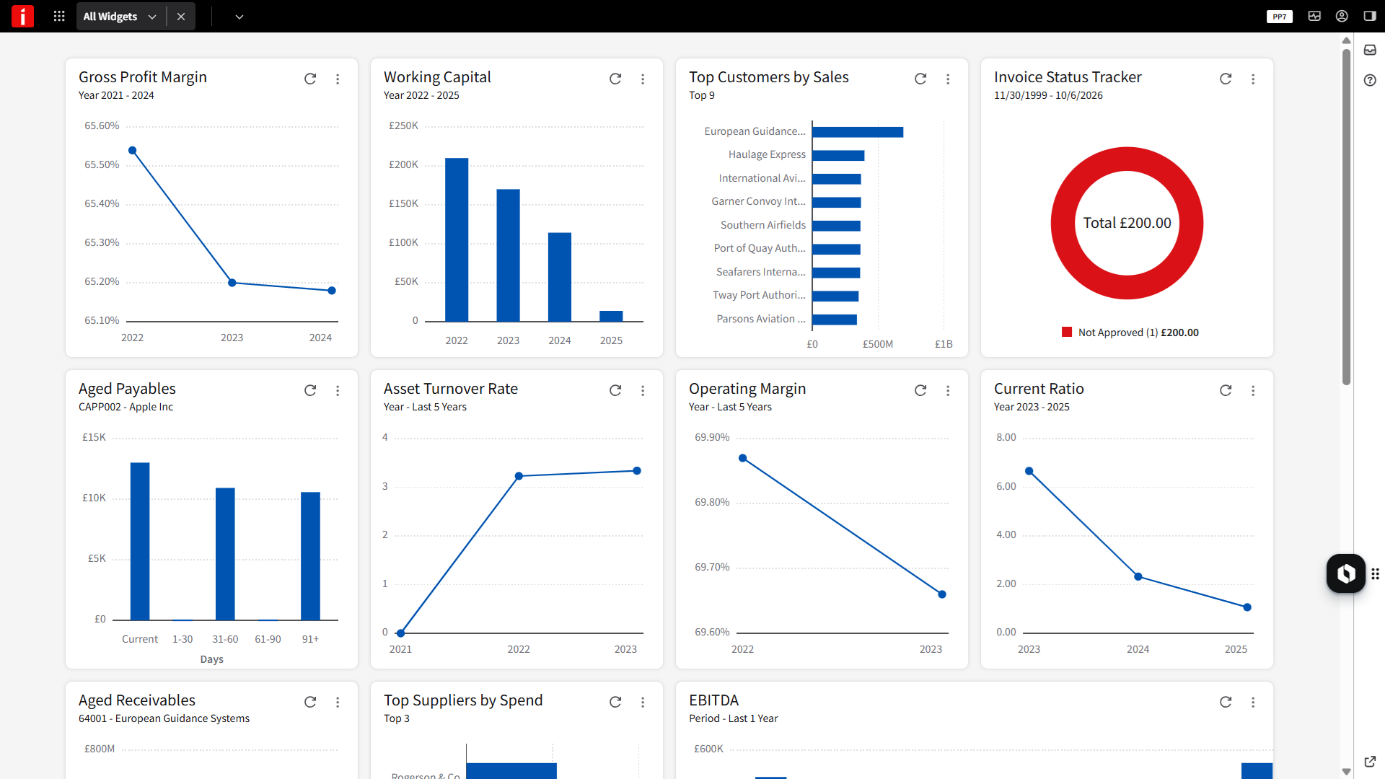
SunSystems widgets are small, ready-made charts that sit on your Infor OS dashboard. Each one shows a standard finance metric using live SunSystems data, with no report-building needed – just choose an existing widget from the catalogue and set it up for your business unit.
The widget catalogue in SunSystems Cloud has greatly expanded since they were introduced in October 2025. First six SunSystems widgets were built for Accounts Payable. October 2026 adds 12 new dashboards that cover receivables and a set of metrics for senior finance roles:
Receivables: Aged Receivables and Top Customers by Sales
Liquidity: Working Capital, Current Ratio, and Quick Ratio
Profitability: Gross Profit Margin, Net Profit Margin, Operating Margin, and EBITDA
Returns and efficiency: Return on Assets (ROA), Return on Equity (ROE), and Asset Turnover Rate
Instead of building a full Q&A report, you can now see the numbers you need right away on your Infor OS home page.
How the Widgets Work
- Configurable to your structure. CFO widgets can be set by business unit, analysis dimension, and analysis codes, and viewed by period, year, or ledger analysis. Receivables widgets filter by business unit, customer, and date.
- Use the same widget more than once. Add Working Capital once per business unit, for example, each with its own settings.
- Build dashboards by role. Create role-based dashboards to give each team only the widgets it needs.
- Security carries over. People only see data they already have access to in SunSystems.
- Hover and drill down. Every widget shows exact figures on hover. Aged Receivables, Top Customers by Sales, and Net Profit Margin also let you drill down to a data grid or back to the underlying transactions in SunSystems.
Query & Analysis: Six Changes You’ll Notice
Query & Analysis is where many SunSystems users spend their day, so every little click counts. The 2026.10 release brings six changes that save time when building and running reports.
Internal report definitions. Summary and detail reports now keep an internal definition inside the workbook. If someone deletes the formulas, the report structure can be restored rather than rebuilt from scratch.
Scheduled parameters. One scheduled workbook can run multiple times against different values, such as business unit or account code, in each schedule entry. You no longer need a separate workbook for each value.
Breakout formatting. Negative numbers formatted with parentheses now keep that format when you run a breakout or expand.
Independent From and To account mapping. From and To account ranges can be mapped separately, allowing you to fully control ranges on the spreadsheet.
Output field placement. Insert output fields wherever you need them, instead of dragging them up from the bottom of the list.
Delete in Drill Path Manager. Saved drill paths can be removed with a new visible delete button, instead of the keyboard Delete key, which wasn’t obvious.
Every Journal, Linked to the Workbook Behind It
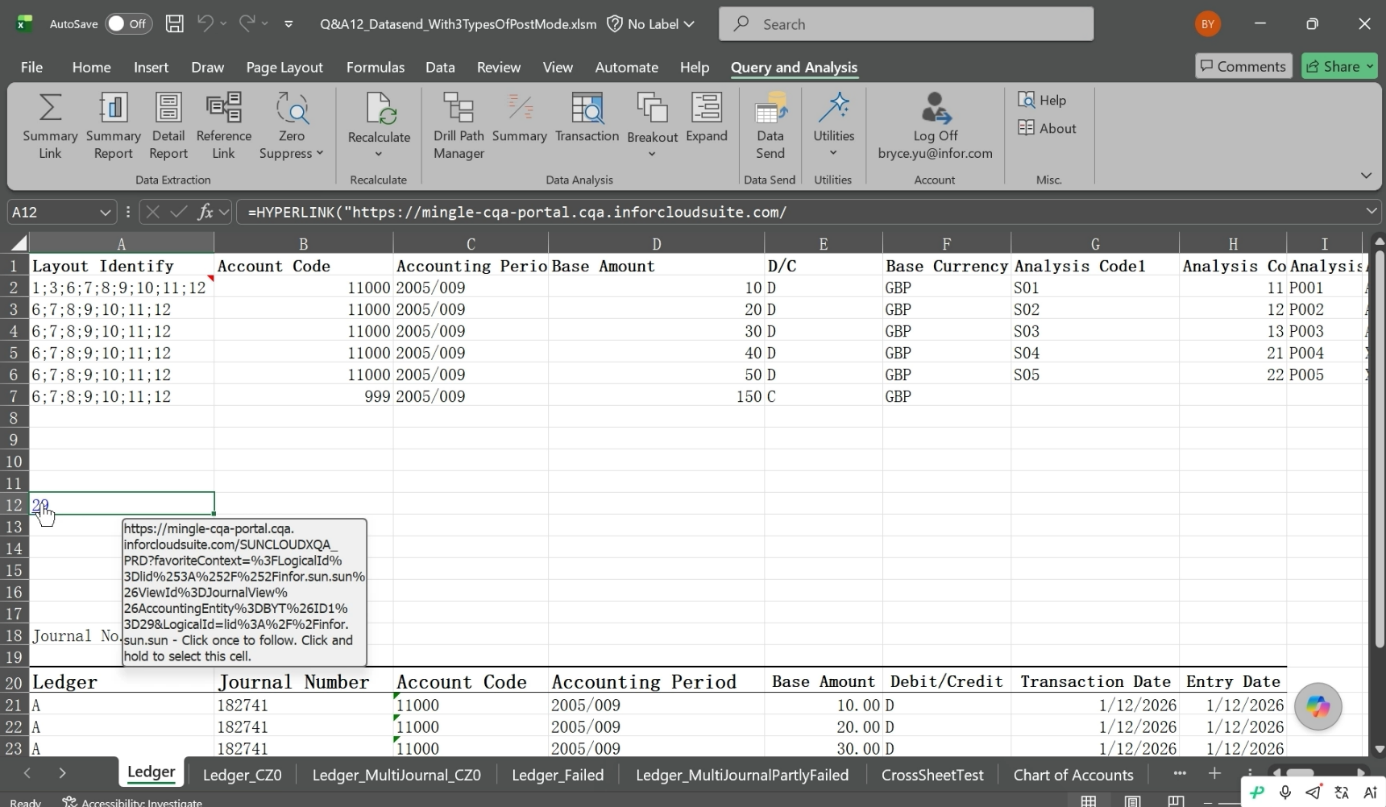
Currently, when posting journals from Excel via Q&A, you also need to keep the source workbook to show which journal it produced. That requires saving a disconnected version of a workbook in your network.
With the 2026.10 upgrade, the workbook is saved automatically, closing the gap and reducing manual work. When a data send succeeds, Q&A uploads the workbook to Infor Document Management (IDM). It is tagged with the business unit and journal key, and Q&A writes a drill-back link into the spreadsheet that opens the journal in SunSystems.
If the send fails, nothing is uploaded, so your document repository only ever holds workbooks that actually posted.
It is worth mentioning that:
- One data send can produce several journals, each linked back to the same workbook
- It works for Purchase, Sales, and Movement Order data sends, as well as Ledger
- You can apply your own naming convention to stored workbooks
- Workbooks can be uploaded directly to IDM without posting to SunSystems
Setup is a one-time task for your administrator, who needs to create document types for the data send definitions you want to link. It uses the existing IDM-User role, so no new permissions are needed.
The next time an auditor asks where a journal came from, the answer is one click away.
Integration and API Updates
Infor describes SunSystems Cloud as API-first, and this release brings several changes for integrations that strengthen the platform foundation and accelerate certain processes:
Business unit and person ID on workflow BODs. One ION workflow can now run across business units and show who took an action, without XSLT workarounds or extra user lookups.
Payload API timeouts and job tracking. An optional maximum wait time stops requests sitting in the queue and processing against stale data. A unique job ID follows each request end to end, so a stalled import can be traced, with less risk of posting the same data twice.
New reference-data endpoints. Code lists, supplier and customer tax IDs, and rule data sets now have their own Business Object API endpoints, cutting the need for manual extracts or Transfer Desk workarounds.
New BODs for TaxAccounts, Contacts, and PaymentTerms. Changes to these records are pushed to connected systems as they happen, instead of fetched on a schedule.
Faster BOD publishing for large tenants. Publishing across multiple business units is now quicker and more consistent.
Large extracts without paging. Business Object and Payload API results can be written straight to a Storage folder.
An API behind every widget. The Portal Widgets API now covers each new widget, so the same summarised data can feed Infor OS widgets, custom reports, or external systems.
Infor SunSystems 2027 Roadmap
The progress never stops, so Infor is already planning its next releases for SunSystems Cloud. Here’s what to expect in future releases.
Native Making Tax Digital. VAT obligations, returns, liabilities, and payments will run as one connected process within SunSystems, with less reliance on third-party connectors.
More finance widgets, including total aged payables and receivables across all suppliers and customers, ledger balance, actual vs budget, revenue growth, days sales outstanding, and a simple KPI widget.
Business Object API V2. A rebuild that takes coverage from around 130 business objects to more than 500, with aggregate functions such as sums, counts, and averages, higher rate limits, and auto-generated API documentation.
BOD filtering, so a first load into a data lake doesn’t have to carry years of history with it.
A Fixed Asset BOD, so fixed asset changes are pushed to connected systems as they happen.
How to Get the Most from 2026.10
The Q&A fixes arrive with the release, while other new functions need to be set up. We prepared a short checklist for when the release goes live:
- Read the release notes. The full 2026.10 notes are on the Infor Support Portal.
- Add the widgets that matter to you. Pick widgets from the catalogue, map them to your business units and analysis codes, and build a dashboard for each role.
- Set up the IDM link. Ask your administrator to create document types for your journal data send definitions.
- Review your scheduled Q&A reports. Look for sets of near-identical workbooks, one per business unit or code range, that can now run as one.
- Brief your integration team. Share the new BODs and Payload API timeouts, and flag API V2 for 2027 planning.
- Tell us what’s missing. Infor is gathering input for the next round of widgets and enhancements, so don’t hesitate to share your opinion. Send us a message and we will pass it on to Infor.
How FinanSys Can Help
As a leading Infor SunSystems Cloud partner, FinanSys can walk your team through the 2026.10 changes, advise on which features to adopt first, and help set them up.
If you are not on SunSystems Cloud yet, we can help you migrate in as little as 90 days, and get every release like this one as it lands.
Book a call with our team to discuss what the October release means for your organisation.
Frequently Asked Questions
When is the SunSystems Cloud October 2026 release?
Release 2026.10 is scheduled for the 20th of October 2026. The release notes are available on the Infor Support Portal.
Do I need to do anything to get new features?
The Q&A fixes arrive with the release. The widgets need adding from the catalogue and mapping to your business unit setup, and the workbook-to-journal link needs a one-time document type setup in IDM.
Do I need to pay for Infor Document Management?
No, if you have an active subscription to SunSystems Cloud. IDM is included in the SunSystems Cloud package.
Is Making Tax Digital included in 2026.10?
No. Native MTD support is planned for the April 2027 release, pending HMRC certification.
Does this release apply to SunSystems on-premises?
No, 2026.10 is a SunSystems Cloud release.

